Monday, April 29, 2013

ASP.NET Popup Control Displaying as multiple nested modal popups


Introduction

We all have used the ModalPopupExtender and know the working of this control. It displays a detail part as a model, which means we cannot interact with another part of the page except the detail part. But there is a problem inModalPopupExtender. When we show another ModalPopupExtender on the first one, it does not hide the firstModalPopupExtender. We can still interact with the first ModalPopupExtender.
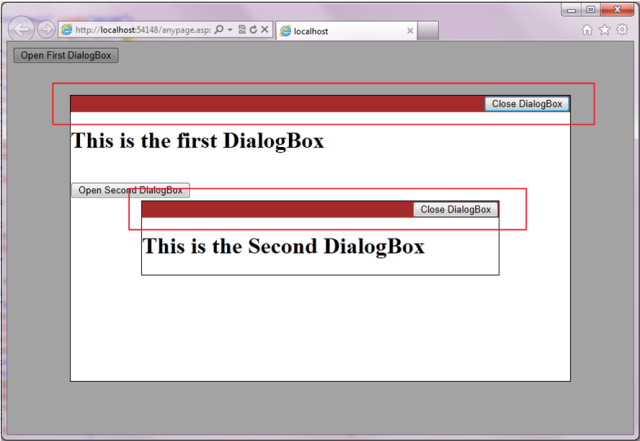
Image No. 1. “Parent and child Dialog Box”
Here the first and second dialog boxes are active. We can access both. Sometimes it spoils the application logic.
So here I am solving this problem by a User Control named ModelPopupRelation. It sets the child model popup on the parent model popup. You can add multiple ModelPopupRelation controls to set multiple relations between model pops. We can nest many model pop controls to any level.
Example:
<uc1:ModelPopupRelation ID="ModelPopupRelation1" runat="server" ParentModelPopupID="mpeFirstDialogBox"
   ChildModelPopupID="mpeSecondDialogBox" Start="false" />

Background

Before starting the ModelPopupRelation control we should clear some things related to model pop functionality.
<asp:Button ID="btntargetControlOfmpeFirstDialogBox" 
   runat="Server" Text="" Style="display: none;" />
<cc1:ModalPopupExtender ID="mpeFirstDialogBox" runat="server" 
  TargetControlID = "btntargetControlOfmpeFirstDialogBox" 
  PopupControlID = "pnlFirstDialogBox" CancelControlID="btnCloseFirstDialogBox" 
  Backgrou BehaviorID="mpeFirstDialogBox">
</cc1:ModalPopupExtender>
<asp:Panel ID="pnlFirstDialogBox" runat="server" BorderStyle="Solid" BorderWidth="1" 
             Style="width: 700px; background-color: White;  display: none; height: 400px;">
       <h1>  This is the first DialogBox</h1> 
</asp:Panel>
In the above code ModalPopupExtender is displayed when the user clicks on the buttonbtntargetControlOfmpeFirstDialogBox or ModalPopupExtender is shown dynamically by the Show() method. The Button control btntargetControlOfmpeFirstDialogBox is required  as the TargetControlID property for the ModalPopupExtender. The Panel named pnlFirstDialogBox shows the detail part. In an HTML Page this becomes:
<div id="pnlFirstDialogBox" style="left:624px; top: 27.5px; width: 35%; height: 400px; position: fixed; z-index: 10001;
  background-color: white;">[includes detail part as you specified]</div>"
The background element that prevents you from interacting with other parts of the page during model popup display looks like this in HTML:
<div style="left: 0px; top: 0px; width: 1920px; height: 455px; position: fixed; z-index: 10000;"
  id="mpeFirstDialogBox_backgroundElement"
  class="ModalPoupBackgroundCssClass"></div>
ModalPopupExtender includes a property BackgroundCssClass for  this background element.
ModelPopupRelation User Control 
This control implements functionality that is not supported by ModalPopupExtender. It sets one popup on another popup control. It provides three properties as you can see in the below code.
<uc1:ModelPopupRelation ID="ModelPopupRelation1" runat="server" ParentModelPopupID="mpeFirstDialogBox" 
   ChildModelPopupID="mpeSecondDialogBox" 
   Start="false" 
/>
  1. ParentModelPopupID: The id of the first  ModalPopupExtender. That shows the second model popup.
  2. ChildModelPopupID: The second model popup control.
  3. Start: By default it’s true. It allows the control to set relation between model popups.
Serverside methods:  
To implement this there are some server side method :
  1. private String GetControlClientID(String modelPopupDialogBoxID)
  2. According this function gets the Client id of the model popup. We need this id in JavaScript code (client side scripting).
  3. private Control ModalPopupExtenderControlSearch(Control _Control, String ModalPopupExtenderID)
  4. This function searches the model popup control into the whole page. 
You can see more detail in the attached project. Both functions are fully commented.
Client  Side Methods:
  1. function EndRequestHandler<%=FunctionUniqueName %>(sender, args)
  2. This function is called after an asynchronous postback is finished and control has been returned to the browser. This function calls CreateRelation() function.
  3. function  CreateRelation<%=FunctionUniqueName %>(ParentModelPopupID, ChildModelPopupID)
  4. This function takes two arguments ,the client id of the parent and child model popup control. It sets the z-index of the child model popup control. That is the main logic of this User Control.
  5. function Get_PopUpContrl<%=FunctionUniqueName %>(PopupControlID)
  6. This function searches the model popup control by the help of PopupControlID.
Main Logic : 
Now I am describing the main logic of the User Control. When ModalPopupExtender is rendered, it generates the z-index.  As shown in below screen.
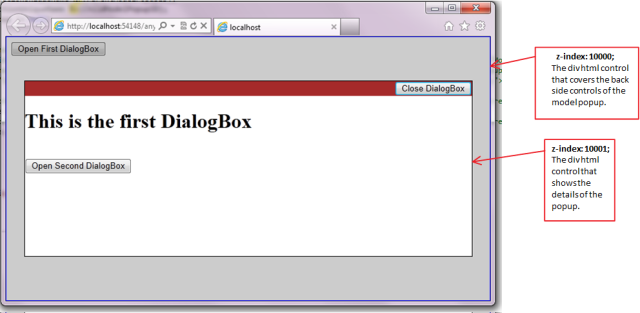
Image No. 2. “Parent Dialog Box”
In this image we can see that ModalPopupExtender generates z-index : 10000 for the background control(div html control). The div html control that covers the back side controls of the model popup. This is the rendered HTML for thebackgroundElement control. 
Background Element:
<div style="left: 0px; top: 0px; width: 1920px; height: 455px; position: fixed; z-index: 10000;"
  id="mpeFirstDialogBox_backgroundElement"
  class="ModalPoupBackgroundCssClass"></div>
Foreground Element:
<div id="pnlFirstDialogBox" style="left: 624px; top: 27.5px; width: 35%; 
   height: 400px; position: fixed; z-index: 10001; background-color: white;">
[includes detail part as you specified]
</div> 
Image No. 3. “Parent and child Dialog Box”
As you can see in the above image (Image No. 3) that we have to make a relation of z-indexes as “N -> (N+1) -> (N+2) -> (N+3) for dialog boxes and background elements. 

Concept

At the end of the document again I want to describe the concept of this control. We have to set a series of z-index for all the dialog boxes that open in nested way. You can add your on logic to set the z-index of all the dialog boxes and there background elements. 
 
Image No. 4. “Parent and child Dialog Box” 

Display Watermark Text for ASP.Net TextBox, Password and MultiLine TextArea using jQuery Plugin


In this article I will explain how to Watermark ASP.Net TextBoxes in SingleLine, MultiLine and Password using jQuery Watermark plugin
HTML Markup
In the below HTML Markup I have ASP.Net TextBoxes with different TextMode i.e. SingleLine, MultiLine and Password i.e. Normal TextBox, TextArea and Password fields. You will notice that I have set ToolTip property of the TextBox, the text in theToolTip property will be displayed as the Watermark text.
UserName:
<asp:TextBox ID="txtUserName" runat="server" ToolTip="Enter UserName">asp:TextBox><br />
Password:
<asp:TextBox ID="txtPassword" runat="server" TextMode="Password" ToolTip="Enter Password">asp:TextBox><br />
Email:
<asp:TextBox ID="txtEmail" runat="server" ToolTip="Enter Email">asp:TextBox><br />
Details:
<asp:TextBox ID="txtDetails" runat="server" TextMode="MultiLine" ToolTip="Enter Details">asp:TextBox>
Applying Watermark to ASP.Net TextBoxes
I have built the jQuery Watermark plugin to apply Watermark to all types of ASP.Net TextBoxes i.e. SingleLine, MultiLine and Password.
<script type="text/javascript" src="http://ajax.googleapis.com/ajax/libs/jquery/1.8.3/jquery.min.js">script>
<script src="WaterMark.min.js" type="text/javascript">script>
<script type="text/javascript">
    $(function () {
        $("[id*=txtUserName], [id*=txtPassword], [id*=txtDetails]").WaterMark();
        //To change the color of Watermark
        $("[id*=Email]").WaterMark(
        {
            WaterMarkTextColor: '#000'
        });
    });
script>
The Watermark jQuery plugin has an optional property WaterMarkTextColor which can be used to set the color of the Watermark text.
The complete page HTML markup is provided below
<html xmlns="http://www.w3.org/1999/xhtml">
<head runat="server">
    <title>title>
<script type="text/javascript" src="http://ajax.googleapis.com/ajax/libs/jquery/1.8.3/jquery.min.js">script>
<script src="WaterMark.min.js" type="text/javascript">script>
<script type="text/javascript">
    $(function () {
        $("[id*=txtUserName], [id*=txtPassword], [id*=txtDetails]").WaterMark();
        //To change the color of Watermark
        $("[id*=Email]").WaterMark(
        {
            WaterMarkTextColor: '#000'
        });
    });
script>
head>
<body>
    <form id="form1" runat="server">
    UserName:
    <asp:TextBox ID="txtUserName" runat="server" ToolTip="Enter UserName">asp:TextBox><br />
    Password:
    <asp:TextBox ID="txtPassword" runat="server" TextMode="Password" ToolTip="Enter Password">asp:TextBox><br />
    Email:
    <asp:TextBox ID="txtEmail" runat="server" ToolTip="Enter Email">asp:TextBox><br />
    Details:
    <asp:TextBox ID="txtDetails" runat="server" TextMode="MultiLine" ToolTip="Enter Details">asp:TextBox><br />
    form>
body>
html>
Demo
Downloads
The above code has been tested in the following browsers

Internet Explorer  FireFox  Chrome  Safari  Opera 

Monday, April 22, 2013

function ป้องกัน user กดคลิ๊ก ปุ่ม หลายๆครั้ง


เชื่อว่าหลายคนคงเจอปัญหานะครับ กับ การที่ user คลิ๊กปุ่มเดิมซ้ำๆ ในกรณี ที่คลิ๊กแล้ว page ไม่โหลดซะที

พอโหลดแล้วปรากฏว่า ข้อมูลขึ้นมาเต็มไปหมด (ในกรณีที่ เป็นการ save ข้อมูลใหม่นะครับ)

สำหรับ .NET 2.0 นะครับ ถ้า 1.1 ให้ ตัด “ClientScript” ออกครับ

Public Sub ClickOnceButton(ByRef page As Page, ByRef b As Button)Dim oneClickScript As System.Text.StringBuilder = New System.Text.StringBuilder()oneClickScript.Append(

“if (typeof(Page_ClientValidate) == ‘function’) { “)oneClickScript.Append(“if (Page_ClientValidate() == false) { return false; }} “)oneClickScript.Append(

“this.value = ‘Please wait…’;”)oneClickScript.Append(“this.disabled = true;”)oneClickScript.Append(page.ClientScript.GetPostBackEventReference(b,

“”))oneClickScript.Append(“;”)b.Attributes.Add(

“onclick”, oneClickScript.ToString())End Sub

ถามว่าใช้ .net 2.0 มี onClientClick ไม่ใช่เหรอ ทำไมไม่ใช้  ก็ใช้ได้ครับ ในกรณีที่ คุณไม่ได้ assign property onClientClick ไว้ที่ ปุ่ม

แต่ถ้าหา assign ค่าไว้ ค่าที่ assign ไว้จะถูกเขียนทับครับ

วิธีการใช้นะครับ


 ClickOnceButton(Me.Page, Me.btnSave)

เท่านี้ เวลา ที่ use click ปุ่ม จะสามารถกดได้ครั้งเดียว เมื่อกดไปแล้วปุ่มจะถูก disable ไว้เหมือน ปุ่ม “ส่งข้อความใหม่” ของเวปบอร์ดแห่งนี้หล่ะครับ

 ขอบคุณครับ

ที่มา: http://www.greatfriends.biz/webboards/msg.asp?id=41339

Don't Ask Me Again' Delete Confirm Using a ModalPopup and ASP.NET's Profile Properties


Like I mentioned in my last post, I have been researching ways to make our web application a little more user friendly by including a handful of personalization features.  This research was oringally spawned from one of our more savvy users that was tired of always confirming deletes via our delete confirm dialog.  Our standard thus far has been to include this confirmation step at every place within the application where we allow the user to perform a delete.  For some users this confirmation step has become a little annoying.  So I nominated myself to look into what it would take to include the typical 'don't ask me this question again' checkbox to our confirmation dialogs.
Notes on the Demo:
  1. Use the 'Reset Profile' button if you want to see the confirm dialog again
  2. I removed the connection string from the download's web.config.  You will need to point to your existing aspnetdb to run my sample locally
  3. If you delete all of the rows, the grid disappears.  The items are stored in session, so open a new browser instance if you want to keep playing with it (the 'Don't ask again' value will be remembered across sessions, but the data for the grid will not be)
  4. Edit is not implemented, but I kept the icon because I liked it.  Our application always redirects edits to a seperate page, so I raise an alert here when the button is clicked
I dug up my old Delete Confirm example and started looking into what it would take to refactor this sample to add this feature.  Below are the steps I took to accomplish this ...

Find Some Style

Often when I do research tasks I build a small demo application that is outside of our current applications codebase.  I find this gives me more freedom, flexibility and faster build times than if I try to add a test page to our main solution.  I also do this because I like to take create new styles and themes based on other cool sites I come across in my day to day web usage.  I use Yahoo! as my email client and I have my color scheme set to 'Ocean' - so for this sample, I created a GridView and ModalPopup styled controls based on the ocean color palette and icons. 
Like I have mentioned before, I primarily use IE's developer toolbar for reverse engineering colors, fonts and images.  Once I have figured out the colors and fonts and have the image files downloaded, I then create the CSS style rules for my controls.  You can view the stylesheet for the live demo here.   

Add Profile Properties Plumbing

After my GridView and ModalPopup were styled to my liking, I then moved on to reading up on ASP.NET Profile Properties.  If you aren't familiar with them, here is the lowdown:
Basically, it's a nice way to have the ASP.NET 2.0 runtime to store and fetch per-user settings.
Before you can start using the Profile Properties, you have to setup the datastore (for this sample the aspnetdb database) and add a few items to your web config.  For my sample, I installed the aspnetdb on my local SQL Server by running aspnet_regsql in a command window.  Running this command opens a wizard tool that allows you to point to the server you want the database installed on. 
After the tool finishes running you should be able to open the database and view the tables that were created.
After you have the database installed, you will need to add a few items to the web.config before you can work with the Profile Properties.  Essentially you need to tell the runtime a few things before you can use the Profile Services
1.  You need to let the runtime know that you plan on using the Profile Services, as well as the names of any properties you plan on using.  The <profile /> element is a direct child of the <system.web /> element.
2.  What provider you are using for the datastore.  The connectionStringName points to the connection string for the database I created using the aspnet_regsql utility.
There, now we have our datastore created and the runtime configured so we are just about ready to make use of the Profile Properties.

Add ASP.NET AJAX Profile Services Plumbing

So as we have our app configured now, we can reference a property called DisplayDeleteConfirm and ASP.NET will auto-magically take care of reading/writing this piece of data on a per-users basis.  But ... because we really want is to be able to read and write this property value from the browser,  we need to do a little bit more work so the ASP.NET AJAX plumbing can work with this property as well ...
1.  Add another entry to the web.config so the ASP.NET AJAX infrastructure knows about our desire to use Profile Properties from the client
2.  Configure the ScripManager (or ScriptManagerProxy) to pre-load our properties by default.  If you don't do this, you will need to make additional out of band calls to fetch this information using the load function.

Read and Write the Profile Properties From the Browser

Now that we have everything configured correctly, we can finally write some code.  Because we have registered our custom property with the ScriptManager, this property will be preloaded so we can access it from the client without doing anything special.  So in my sample site, I have a bit of JavaScript that runs when the user clicks the Delete icon () that reads this property and displays the popup only if the value of this property is false ...
If the value is false, we call __doPostBack using the button that originated the event.  Otherwise we display the popup forcing the user to confirm the delete action.
Additionally, there is a second piece of JavaScript that runs when the user dismisses the confirmation dialog by pressing the 'Yes' button.
This bit of JavaScript checks to see if the 'Don't ask again' checkbox is checked and if it is sets the DisplayDeleteConfirm property value to false, calls save on the ProfileServices object, and forces the postback ...
Now that you have all of the plumbing in place, it should be much easier to incorporate similar functionality for other areas of you application. 
If you download the sample and run it locally, you will notice that after you check the 'don't ask me again' box and click 'Yes', a new record will show up in the dbo.aspnet_Profile table ...
 

Room to Improve

As with everything, there is always room to improve it further.  My goal here was to develop a prototype, but I would like to look into the following areas further before productionalizing it ...
  1. Research if ConfirmButtonExtender can be used to replace some of the custom JavaScript calls for __doPostBack (I want to keep both Cancel buttons so I am hoping this will not be an issue)
  2. Yahoo!'s delete confirmation dialog has some nice rounded corners.  I tried (briefly) using the RoundedCornersExtender, but it looked bad.  I am assuming this is user error so I should re-investigate using this
  3. I would venture a guess that 50% of our pages includes a 'Delete Confirm' button.  It would be great if this functionality could be packaged into a component that could be reused a little better than this.

References

I have really only touched on what you can do with Profile Properties.  If this area is new to you, I would recommend reading the following references to brush up on the concepts.
  1. ASP.NET 2.0 Profile Properties
  2. Personalization and User Profiles
  3. ASP.NET AJAX Profile Information

MSDN Documentation Errors

No ones perfect.  I ran into the following minor documentation bugs while researching this topic.  Beware.
1.  Malformed XML in example: http://www.asp.net/AJAX/Documentation/Live/tutoria... I believe the Backgroundcolor and Foregroundcolor properties need to be under the <properties> tag.
2.  The code sample for save is referring to the load function: http://www.asp.net/AJAX/Documentation/Live/ClientR...
That's it.  Enjoy!